
AI Prompt
Generate text with AI using configured prompts
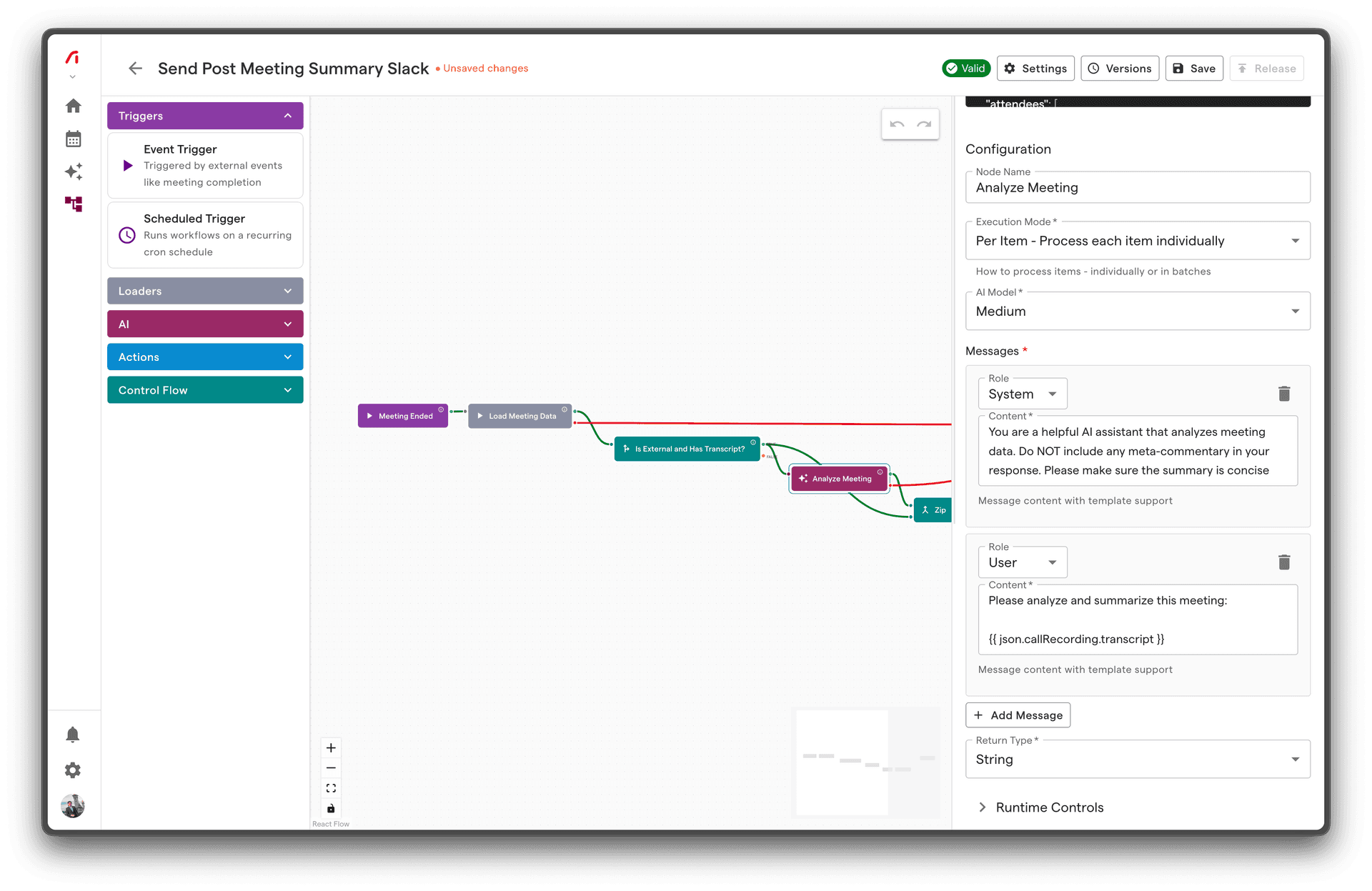
The AI Prompt node generates text using large language models. Configure a system prompt and user message with data from your workflow, and receive AI-generated output in a structured format.
Overview
| Property | Value |
|---|---|
| Category | AI |
| Node IDs | ds.aiPrompt.perItem.in1.success1.error1 (per-item)ds.aiPrompt.batch.in1.success1.error1 (batch) |
| Input Ports | 1 |
| Success Outputs | 1 |
| Error Outputs | 1 |
| Execution Mode | Per-item or Batch |
| Timeout | 120 seconds |
| Retry Strategy | Exponential jitter, max 2 attempts |
Configuration
| Parameter | Type | Required | Default | Description |
|---|---|---|---|---|
model | Select | No | medium | Model tier: low, medium, high |
messages | Array | Yes | - | Chat messages array |
return_type | Select | Yes | - | Output type: string, integer, boolean, float |
Messages Array
Each message has:
- role:
system,user, orassistant - content: Text content (supports Liquid templates)
Input Schema
Accepts any data from upstream nodes. Data is accessible in message templates via json variable.
Output Schema
Success Output
{
  "type": "string",
  "value": "The meeting covered Q1 planning with focus on revenue targets...",
  "usage": {
    "prompt_tokens": 1250,
    "completion_tokens": 150
  }
}
| Field | Type | Description |
|---|---|---|
type | string | The return type you configured |
value | varies | The AI-generated output, parsed to the return type |
usage | object | Token usage statistics |
Output by Return Type
| Return Type | Output Example |
|---|---|
string | "This is a summary..." |
integer | 42 |
float | 0.85 |
boolean | true |
Error Output
{
  "error": "PARSE_ERROR",
  "message": "Could not parse output as integer",
  "rawOutput": "I think the answer is forty-two"
}
Examples
Basic Example: Meeting Summary
Generate a concise summary of a meeting transcript.
Configuration:
Model: medium
Messages:
[System]
You are a professional meeting summarizer. Create concise, actionable summaries.

[User]
Summarize this meeting in 2-3 sentences:

Meeting: {{ json.meeting.title }}
Date: {{ json.meeting.startTime | date: "%B %d, %Y" }}

Transcript:
{{ json.callRecording.transcriptSummary }}
Return Type: string
Output:
{
  "type": "string",
  "value": "The Q1 Planning meeting focused on setting revenue targets of $2M and prioritizing the enterprise segment. Key decisions included hiring two additional sales reps and launching the new pricing tier by February 15.",
  "usage": { "prompt_tokens": 850, "completion_tokens": 52 }
}
Example: Sentiment Classification
Classify meeting sentiment as positive, neutral, or negative.
Configuration:
Model: low (simple classification task)
Messages:
[System]
Classify the sentiment of meeting transcripts. Respond with only one word: positive, neutral, or negative.

[User]
Classify the sentiment of this meeting:

{{ json.callRecording.transcriptSummary }}

Respond with only: positive, neutral, or negative
Return Type: string
Usage in downstream node:
json.value == "positive" // For If node condition
Example: Extract Action Items Count
Count the number of action items mentioned.
Configuration:
Model: medium
Messages:
[System]
Count action items in meeting transcripts. Action items are specific tasks assigned to people with deadlines or follow-ups expected.

[User]
Count the action items in this meeting:

{{ json.callRecording.transcript }}

Respond with only a number.
Return Type: integer
Output:
{
  "type": "integer",
  "value": 5
}
Example: Calculate Confidence Score
Generate a confidence score for deal progression.
Configuration:
Model: high (nuanced analysis)
Messages:
[System]
You are a sales analyst. Evaluate meeting transcripts for signals of deal progression and output a confidence score between 0.0 and 1.0.

Factors to consider:
- Positive buying signals (timeline discussion, budget confirmation)
- Stakeholder engagement
- Objections raised and addressed
- Next steps agreed upon

[User]
Analyze this meeting and provide a deal confidence score (0.0 to 1.0):

{{ json.callRecording.transcript }}

Respond with only a decimal number between 0.0 and 1.0.
Return Type: float
Advanced Example: Few-Shot Learning
Use assistant messages to provide examples:
Configuration:
Messages:
[System]
Extract the main topic of a meeting. Respond with a short phrase (2-5 words).

[User]
Meeting transcript: "Today we discussed the Q1 marketing budget and campaign plans..."

[Assistant]
Q1 Marketing Budget

[User]
Meeting transcript: "The engineering team reviewed the API migration timeline and dependencies..."

[Assistant]
API Migration Planning

[User]
Meeting transcript: {{ json.callRecording.transcriptSummary }}
Return Type: string
Best Practices
1. Be Specific in System Prompts
❌ Vague:
You are a helpful assistant.
✅ Specific:
You are a professional meeting analyst who extracts actionable insights.
Focus on: decisions made, action items assigned, and key discussion points.
Be concise and factual. Do not infer information not present in the transcript.
2. Structure Your User Input
❌ Unstructured:
{{ json.callRecording.transcript }}
✅ Structured:
**Meeting Details**
- Title: {{ json.meeting.title }}
- Date: {{ json.meeting.startTime | date: "%B %d, %Y" }}
- Attendees: {% for a in json.meeting.attendees %}{{ a.name }}{% unless forloop.last %}, {% endunless %}{% endfor %}

**Transcript**
{{ json.callRecording.transcript }}

**Task**
Summarize the key outcomes and next steps.
3. Match Model Tier to Task
| Task Complexity | Tier | Examples |
|---|---|---|
| Simple | low | Yes/no classification, keyword extraction |
| Moderate | medium | Summarization, entity extraction |
| Complex | high | Nuanced analysis, multi-step reasoning |
4. Enforce Output Format
For reliable parsing, be explicit about expected format:
Respond with ONLY a number between 1 and 10. Do not include any other text.
5. Handle Edge Cases
{% if json.callRecording and json.callRecording.transcript %}
{{ json.callRecording.transcript }}
{% else %}
No transcript available. Please indicate this in your response.
{% endif %}
Common Issues
Parse errors
Symptom: Error output with PARSE_ERROR
Cause: AI output doesn't match expected return type
Solutions:
- Add explicit format instructions: "Respond with only a number"
- Use string return type if output varies
- Check for preamble text in AI responses
Timeout errors
Symptom: Node times out after 120 seconds
Cause: Prompt too long, complex reasoning
Solutions:
- Reduce input length (summarize first)
- Simplify the task
- Use a faster model tier
Inconsistent output
Symptom: Same input produces different outputs
Cause: AI models are non-deterministic
Solutions:
- Make prompts more specific
- Use few-shot examples
- For critical consistency, use classification with fixed options
Empty or unhelpful responses
Symptom: AI returns generic or evasive response
Cause: Insufficient context or unclear task
Solutions:
- Provide more context in the prompt
- Break complex tasks into steps
- Verify input data is present
Related Nodes
- AI Agent - For tasks requiring tool access
- Load Meeting - Fetch data for AI processing
- If - Branch based on AI output
Technical Details
Token Limits
Token limits depend on the model tier:
low: ~8K tokensmedium: ~16K tokenshigh: ~32K+ tokens
Tokens are split between input (prompt + context) and output (generated response).
Prompt + Context Size
Your total prompt includes:
- System message
- User message with template-expanded data
- Any assistant messages
If you hit token limits, consider:
- Summarizing long transcripts first
- Selecting relevant portions of data
- Using batch mode to process less data per call
Idempotency
AI Prompt nodes are not strictly idempotent—same input may produce slightly different output. For workflows requiring exact repeatability, consider caching or storing results.